Weather Alerts Through Prowl
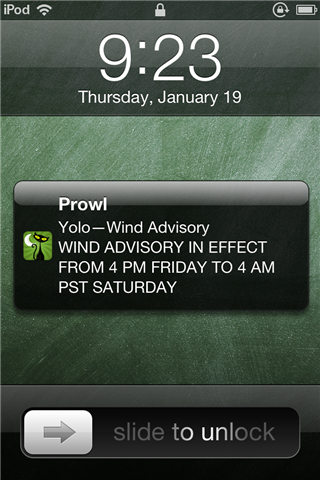
The fun with Prowl continues. After getting it running on my Chumby and WRT54G, I was digging through the Prowl Forums looking for other interesting applications when I found a post by acrollet showing how he has his server watch for severe weather alerts from weather.gov and send them to him as push alerts. I thought it was a good start, but he crammed the whole thing into his cron table as one line, which is a style I just don’t like, so I’ve rewritten his script with some improvements.
How this alert works is that every hour the cron scheduler on my alarm clock downloads a chunk of XML from weather.gov which they make available for every region across the US. So, for example, Yolo county has the county code CAC113, so I have the script hourly download http://alerts.weather.gov/cap/wwaatmget.php?x=CAC113 and check to see if there is a new severe weather alert for Yolo county.
If there is an alert, and it’s at all different from the one seen an hour ago (which the script stores in /tmp/weather.CAC113.old.txt), then the script uses some grep, awk, and tr magic to extract nice clean summaries and an event name for the alert. It then uses the typical curl request I figured out before to fire off the push alert and it blows up my iPod with weather alerts.
One thing that you might notice about the script is that I have all of the heavy lifting done in a single function (queryWeather()), which I then call repeatedly, passing it the zone code and my API key. I did this such that it will be very easy to add or remove zones I want to watch, as well as add friends who also have Prowl onto various zones that they’re interested in (I’m toying with having this automated through a web form).
I have this installed on my Chumby’s SD card (/mnt/storage/scripts/), but this should run in any decent unix environment.
weatheralert.sh
#!/bin/sh

# Kenneth Finnegan, 2012
# kennethfinnegan.blogspot.com
#
# Query weather.gov and send severe weather alerts via Prowl
#
# To have run hourly by cron:
# 00 * * * * /mnt/storage/scripts/weatheralert.sh
#
# 2012 01 18:	Initial revision
# 2012 01 19:	Added support for alert URL
#		Change queryWeather() to use $3 as APIKEY

# Pull in definition for personal Prowl APIKEY
source /mnt/storage/scripts/variables

# Call with weather.gov zone/county code, name string, and
# comma-seperated list of interested APIKEYs, so i.e.
#	"CAC113" "Yolo" "XXXX,YYYY"
# sends Yolo alerts to both user XXXX and YYYY
# Zone codes can be found: http://alerts.weather.gov/
queryWeather () {
	if [ -z "$1" ]; then
		echo "ERROR: zero length zone code"
		exit 1
	fi
	if [ -z "$2" ]; then
		echo "ERROR: zero length zone name"
		exit 1
	fi
	if [ -z "$3" ]; then
		echo "ERROR: zero length API keys"
		exit 1
	fi

	# Backup the old alert summary
	mv /tmp/weather.$1.txt /tmp/weather.$1.old.txt
	# Build the URL for the alert XML based on zone code
	ALERTURL="http://alerts.weather.gov/cap/wwaatmget.php?x=$1"

	# Note that ... seperator between sentences is sometimes mangled
	# which is why the awk field seperator is so crazy
	curl -s "$ALERTURL" | tee /tmp/weather.$1.full.txt | \
		grep '<summary>' | \
		awk -F '\.\.\.|>\.|</s' '{print $2}' | \
		tr -d '.' >/tmp/weather.$1.txt

	# Check to make sure there's a warning at all
	if [ -z "`cat /tmp/weather.$1.txt`" ] ; then
		return 0
	fi

	# Check to see if the alert has changed
	if ! diff /tmp/weather.$1.old.txt /tmp/weather.$1.txt ; then
		# Pull event title out of cap:event tag
		EVENT="`grep 'cap:event' < /tmp/weather.$1.full.txt \
			| awk -F '<|>' '{print $3}' | head -n 1`"
		# Magic curl call to Prowl API
		curl https://api.prowlapp.com/publicapi/add \
			-F apikey="$3" \
			-F priority="1" \
			-F url="$ALERTURL" \
			-F application="$2" \
			-F event="$EVENT" \
			-F description="`cat /tmp/weather.$1.txt`"
	fi
}

# Now call queryWeather with every zone code & name pair of interest to APIKEY
queryWeather "CAC113" "Yolo" "$APIKEY"
queryWeather "CAC085" "Santa Clara" "$APIKEY"